Viewer | 10 Minutes Reading
Best Tips & Tricks to Open MSG File Without Outlook


User Query!
“Hi, I am Rocky and I will not be able to open my MSG file data. I also tried many other solutions to open my MSG file without Outlook. But searching a lot, I still haven’t found a reliable method to overcome this issue. So, please anyone guide me with an appropriate solution to do so.”
Have you received an .msg file but you can’t open it because Microsoft Outlook is not installed on your computer? If so well you are not the only one as there are many who struggle with this same problem “
How to open MSG files without Outlook”. Users receive MSG files from colleagues, clients, legal teams or archived email backups and then they realize that Windows doesn’t know how to open them.
But the good news is that you do not always need Outlook to read your .msg files. This is completely depending on your situation as there are several safe and practical ways to access the email. Some methods are quick but limited while others allow you to safely view complete email details, including attachments without installing Outlook and that is absolutely Free.
In this guide we will explain to you the following in detail:
- What an MSG file actually is
- Whether Windows can open it without Outlook
- Manual methods you can try
- Their limitations and security concerns
- Why an offline read only mode is safest option
- How to open multiple MSG files quickly without risking your data
So if you only need to read a single email or browse hundreds of Outlook MSG files this guide will help you choose the right approach.
Table of Content
- What Is an MSG File?
- Can You Open an MSG File Without Outlook?
- Manual Methods vs Free Viewer
- Why Can’t Windows Open MSG Files Natively?
- Common Situations Where You Need to Open an MSG File
- How to Read MSG File Without Outlook Manually?
- Limitations of Manual Methods
- Research Insight – Why MSG Files Need Specialized Software
- Open Multiple MSG File Without Outlook Professional Solution
- Working Process Guide for Automated Tool
- Finishing Line
- Frequently Asked Questions
What Is an MSG File?
An MSG file is a single email message that is saved by Microsoft Outlook. An MSG file contains just one email along with all of its associated information like Email subject and message body, Sender and recipient details, CC and BCC information, Sent and received date & time, File attachments, Email formatting (HTML or Rich Text), Internet message headers and Message properties and MAPI metadata.
This is because all information regarding a single email is stored in one file. MSG files are commonly used for sharing individual emails, legal documentation, customer support records and email evidence preservation.
Quick Fact: Unlike PDF or TXT files an MSG file is not a plain document however It is a structured Microsoft Outlook email format which is why Windows cannot display it like a normal text file.
Can You Open an MSG File Without Outlook?
Yes. It is possible to open an MSG file without installing Microsoft Outlook. However, the method you choose determines how much information you can actually access.
If your goal is simply to view only email then there are manual methods available. But if you need to read attachments, keep original formatting, open multiple MSG files or you want to examine email properties well a dedicated Viewer is the best option here.
Here you can check the table below for a quick comparison.
Manual Methods vs Free Viewer
| Requirement | Manual Methods | Free Viewer |
|---|---|---|
| Read email content | Limited | Yes |
| View attachments | Usually No | Yes |
| Open multiple MSG files | Difficult | Yes |
| Preserve original formatting | Not always | Yes |
| Works without Outlook | Yes | Yes |
| Offline and private | Depends | Yes |
| Easy for beginners | No | Yes |
Microsoft Outlook stores MSG files using the
Compound File Binary Format (CFBF) and also known as the OLE structured storage format. This format keeps email body, attachments, message headers, recipient information, timestamps and all other metadata inside a single structured container. Because Windows File Explorer doesn’t natively understand this proprietary Outlook format that is why double clicking an MSG file won’t display its contents unless using a compatible software.
Why Can’t Windows Open MSG Files Natively?
One of the biggest misconceptions is that Windows should open every file format automatically. But unfortunately that is not how MSG files work.
An MSG file is a Microsoft Outlook specific format and Windows doesn’t include a built-in email viewer which is capable of interpreting its internal structure. That is why there are many users experience situations like these:
- Double clicking MSG file does nothing.
- Windows asks you to choose an application.
- The file opens with unreadable characters.
- Only a partial preview appears.
- Attachments cannot be accessed.
This happens because Windows recognizes your file extension but doesn’t understand the Outlook message format stored inside it.
Another common mistake like many users make is they simply try to rename their file extension from .msg to .txt, .pdf or .html. Changing the extension does not convert your email into another format. Instead it often makes your file unusable or hides important email information. So you must avoid doing this.
Common Situations Where You Need to Open an MSG File
People have various reasons for searching for ways how to open MSG files without Outlook. By understanding your specific situation you can choose the best method without wasting time.
- You received an MSG file from someone else
- When you are accessing an old Outlook backup
- If you are handling legal or business records
- When you need to open multiple MSG files
- And if you don’t want to upload confidential emails online
Security Note: If you have MSG files containing sensitive information such as business emails, customer data, legal documents, medical records, or financial records well then you must use an offline tool to Viewer msg files rather than uploading your msg files to an online server.
How to Read MSG File Without Outlook Manually?
There are several who are still suffering to get a resultant result for their issue. But, they cannot find any way to do. And, some of them are looking for manual methods. So, in the section below we have listed some steps to perform this task manually. Go and follow the below working steps for the same!
Want to open MSG Files without Outlook installation? If yes, then you need to change the MSG file extension into HTML file format. Then, you need MSG files in the browser.
- Select “MSG File” which you wish to change into HTML format.
- Click on File, and choose the “Save As” option
- Now, select HTML Format.
So, performing this above solution, you will easily open the .msg files extension without any MS Outlook installation. Learn that using the manual method users cannot read MSG files along with attachments. Or they need to process steps again and again for each MSG file. But, no need to worry at all! We have suggested an automated tool in the below section that has no restrictions and is safe for users.
Limitations of Manual Methods
Manual methods can work in some situations but they also have several limitations that many users don’t find until after they have spent a lot of time trying them. Here are the most common challenges when you are choosing manual methods.
- They Don’t Scale Well
- Attachments May Not Be Accessible
- Original Formatting Can Be Lost
- No Search or Organization
- And There Are Privacy Risks
Research Insight – Why MSG Files Need Specialized Software
Unlike any common document formats such as PDF or DOCX an MSG file is designed specifically for Microsoft Outlook. Each MSG file contains multiple layers of information and these information are:
- Email body and Message properties
- MAPI attributes and Attachments
- Internet headers and Recipient details
- Rich text or HTML formatting
Because this information is stored inside Microsoft’s proprietary message structure so general purpose applications cannot interpret every component correctly. This is why dedicated viewers often provide you a much more complete preview than generic file viewers.
Did You Know?
In digital forensics and eDiscovery workflows the investigators typically review MSG files using specialized email viewers without converting the file first. Viewing emails in their original format helps preserve metadata and reduces the risk of losing critical information during the conversion process. You can switch to FORENSICWARE Viewer Pro Plus Version for MSG analysis.
Open Multiple MSG File Without Outlook Professional Solution
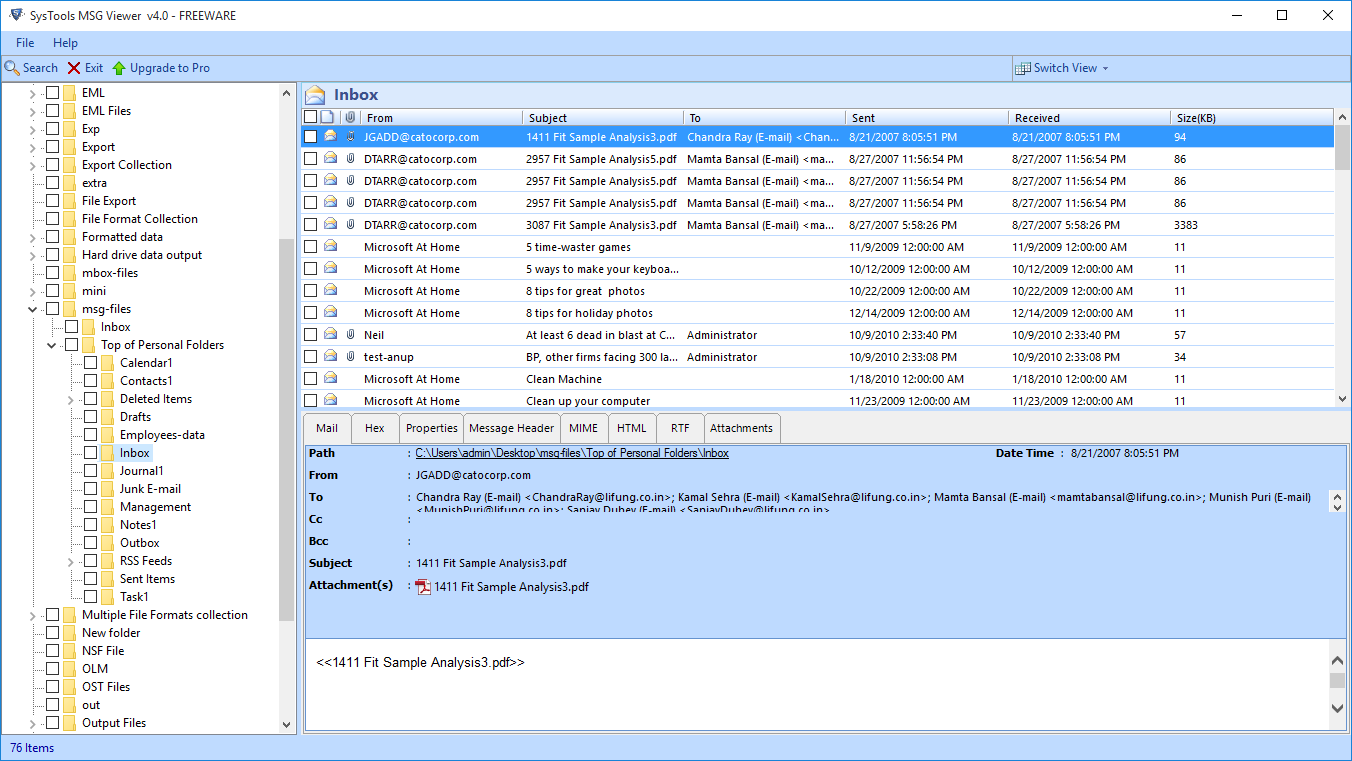
Explore the best MSG Viewer Tool which is designed with advanced algorithms. This tool allows users to easily browse, view, and read MSG files in an easier manner. Users can easily preview MSG files with MIME View, RTF View, Hex View, etc.
Moreover, this automated tool also maintains the folder hierarchy of the MSG folder. To sort the MSG emails with all attributes like: From, To, Sent, Received, etc. Both the technical and non-technical users can easily open multiple MSG files with / without Outlook installation in their machines.
This is how automated tool work for any kind of problem. Now, it’s time to move towards the software working steps to more quick & simple solutions for non-technical users.
Working Process Guide for Automated Tool
Following are simple steps to view MSG files in bulk format along with attachments. Using the above professional tool.
1. Download the Tool on your Windows system.
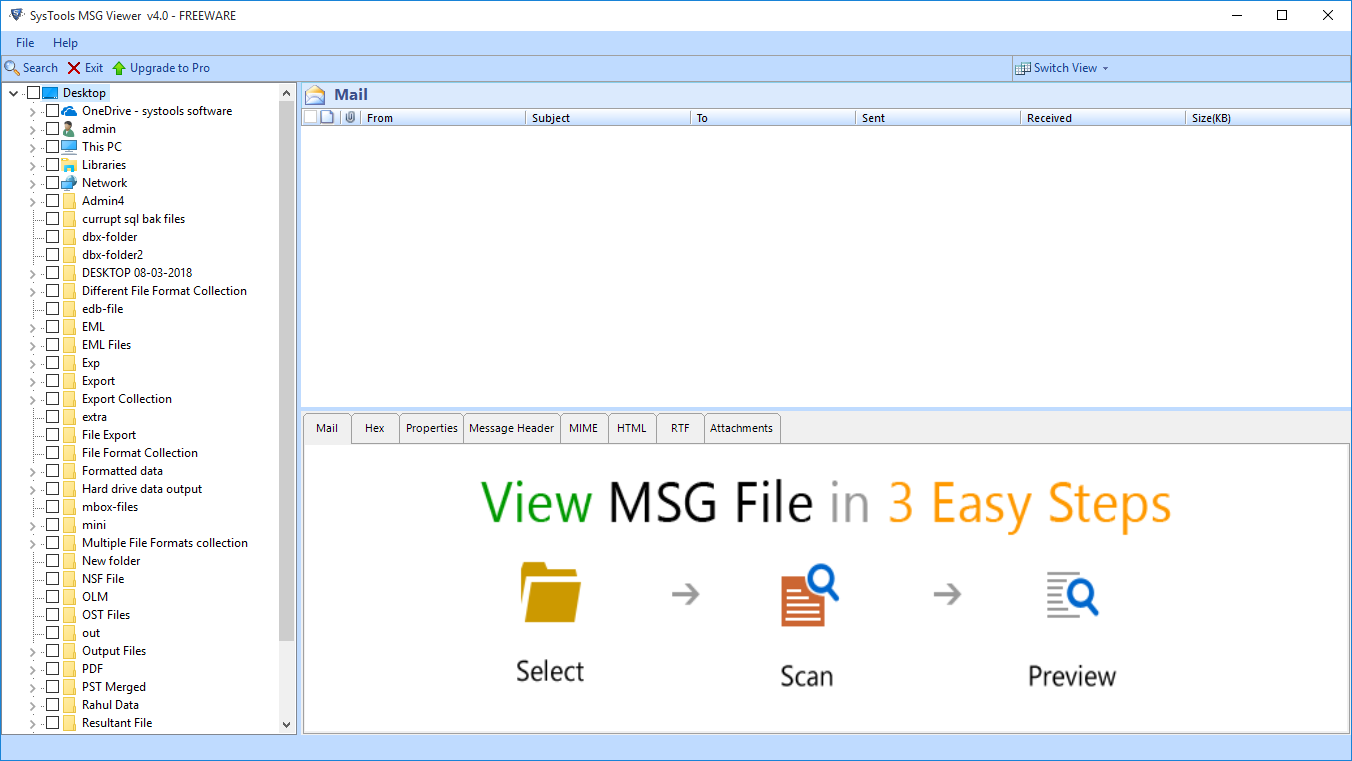
2. Explore & Read MSG File Message and Preview Emails along with Attachments
3. Choose “Switch View” option to choose between Horizontal and Vertical Views
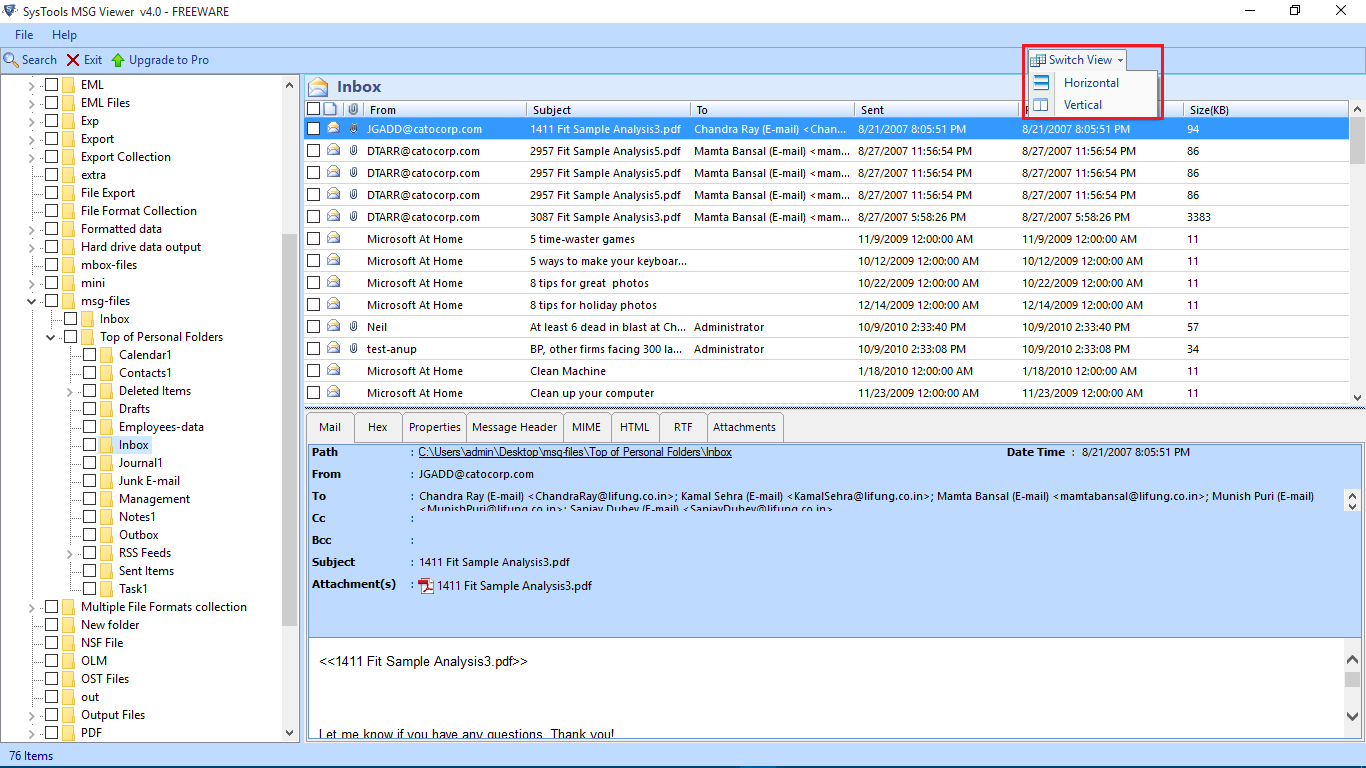
4. Finally, you have multiple views to read Outlook MSG Files.
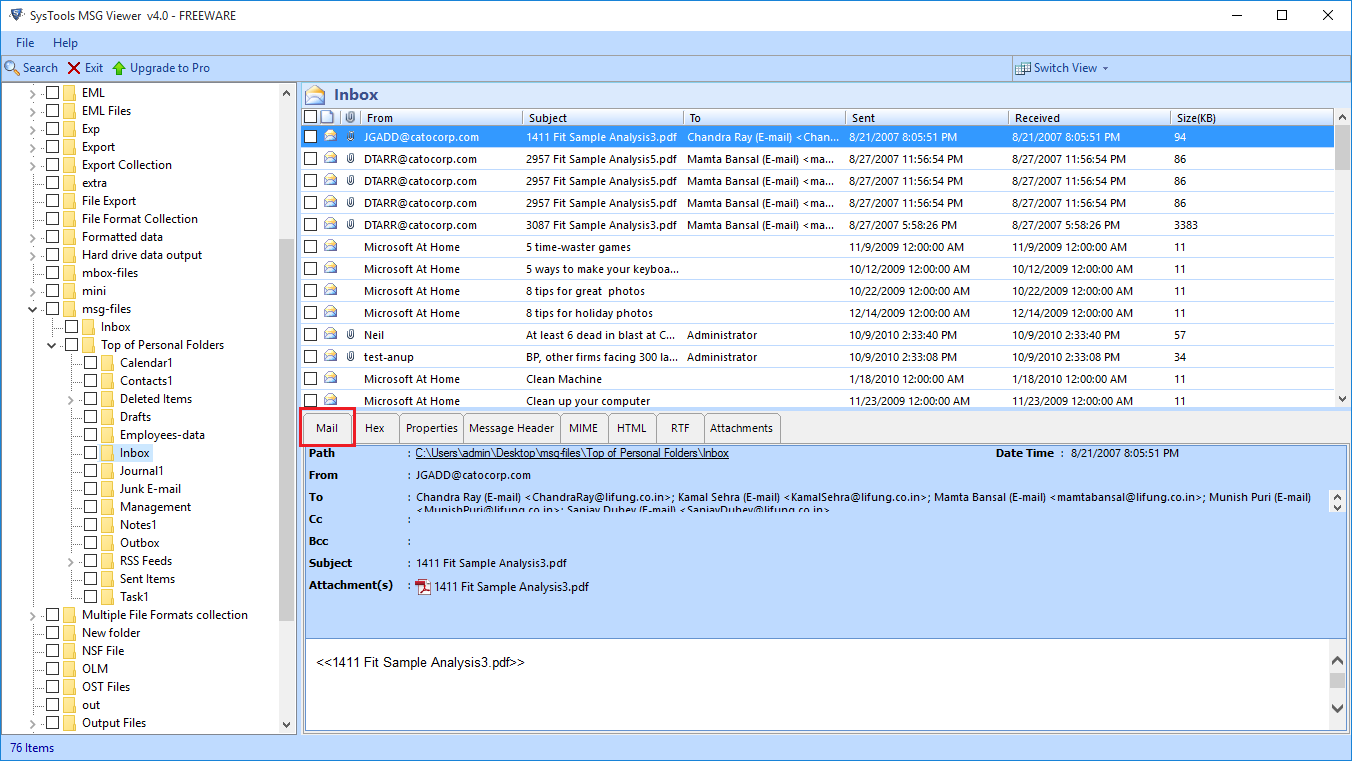
Here, we have performed both the manual and automated methods. After using these two different ways that allow users to easily open multiple MSG files Without Outlook. So, according to our expert recommendation we suggested you to go with the above automated tool which safe & provides 100% generate for data security. Or you can choose per your needs!
Finishing Line
In this article, we have explained two wonderful ways to easily Open MSG file Without Outlook in an hassle-free manner. This blog provides solutions for technical and the non-technical users where they can easily perform their task without losing any data. The above manual method you see is easy & simple but it is difficult for novice users and has some of its own challenges. On the other hand, we have suggested to you an automated solution that provides many advanced features to easily read & view MSG files in bulk with attachments without any MS Outlook installation. Read this blog carefully and get a solution for your issues.
Frequently Asked Questions
Q1. Can I open an MSG file without Microsoft Outlook?
Yes. Using the automated tool you can easily open MSG files with or Without any Outlook installation in your PC.
Q2. Can Windows open MSG files by default?
No. Windows doesn’t support the MSG file format natively so you will need Outlook or a dedicated Viewer to access all email properly.
Q3. Can I view attachments in an MSG file without Outlook?
Yes. A dedicated tool allows you to preview both the email content and its attachments without needing Outlook.
Q3. Is it safe to use an online Viewer to read MSG files?
Well it completely depends on your file. If your MSG file contains confidential or business information then an online tool is not a safer option as there is a high chance of data leak. In such a situation you must use an offline
dedicated Viewer so your data never leaves your computer.